useFetch Bug 前言 最近在開發 Nuxt3 的時候踩到一個 useFetch 的雷,剛好這個雷好像滿多朋友都有踩到,所以就順便記錄一下。
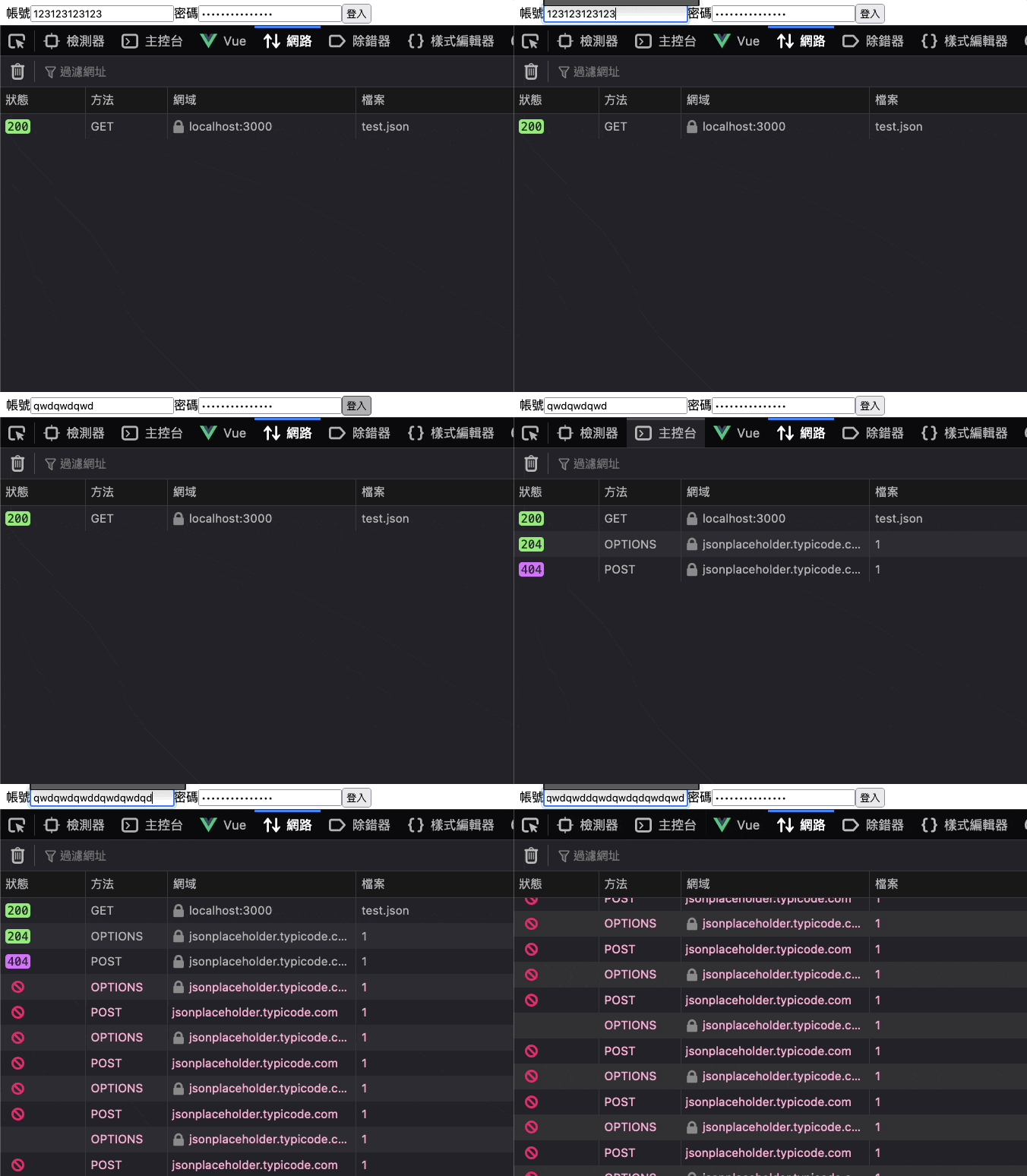
錯誤原因 首先先提一下錯誤狀況,底下你可以發現一開始我在輸入表單時很正常,但是當我送出表單後,在點擊輸入框就會無限觸發 API…
Gif 那麼範例程式碼長怎樣呢?讓我們來看一下
1 2 3 4 5 6 7 8 9 10 11 12 13 14 15 16 17 18 19 20 21 22 23 24 25 <script setup > const login = ref ({ account : '' , password : '' , }) const submit = async ( const { data } = await useFetch ('https://jsonplaceholder.typicode.com/todos/1' ,{ method : 'POST' , body : login.value , }) } </script > <template > <div > <form @submit.prevent ="submit" > <label for ="account" > 帳號</label > <input id ="account" type ="text" v-model ="login.account" /> <label for ="password" > 密碼</label > <input id ="password" type ="password" v-model ="login.password" /> <button type ="submit" > 登入</button > </form > </div > </template >
程式碼非常單純,但就是不知道為什麼會發生,所以就來記錄一下該如何解決。
解決方式 首先我們先來看一下 useFetch 的官方文件,裡面有一個 watch 的選項,而這個選項就是用來監聽資料變化的
watch: watch an array of reactive sources and auto-refresh the fetch result when they change. Fetch options and URL are watched by default. You can completely ignore reactive sources by using watch: false. Together with immediate: false, this allows for a fully-manual useFetch.
預設來講他會是關閉的,但是當你有使用 watch 的時候,他就會自動監聽資料變化,而這個監聽資料變化的功能就是導致我們無限觸發 API 的原因。
但很有趣的問題來了,官方文件所給的 type:
1
2
3
4
5
6
7
8
9
10
11
12
13
14
15
16
17
18
type UseFetchOptions <DataT > = {key ?: string method ?: string query ?: SearchParams params ?: SearchParams body ?: RequestInit ['body' ] | Record <string , any >headers ?: Record <string , string > | [key : string , value : string ][] | Headers baseURL ?: string server ?: boolean lazy ?: boolean immediate ?: boolean getCachedData ?: (key : string DataT deep ?: boolean default ?: () => DataT transform ?: (input : DataT DataT pick ?: string []watch ?: WatchSource [] | false
我們可以看到預設會是 false,但是我們的問題是沒有設定 watch,但是卻還是會無限觸發 API,那該怎麼解決呢?
JSON.stringify 第一種方式則是使用 JSON.stringify,這個方式是將 login.value 轉成字串
1 2 3 4 5 6 7 8 9 10 11 12 13 14 15 16 17 18 19 20 <script setup > const submit = async ( const { data } = await useFetch ('https://jsonplaceholder.typicode.com/todos/1' ,{ method : 'POST' , body : JSON .stringify (login.value ), }) } </script > <template > <div > <form @submit.prevent ="submit" > <label for ="account" > 帳號</label > <input id ="account" type ="text" v-model ="login.account" /> <label for ="password" > 密碼</label > <input id ="password" type ="password" v-model ="login.password" /> <button type ="submit" > 登入</button > </form > </div > </template >
watch: false 第二種方式則是直接強制關閉 watch
1 2 3 4 5 6 7 8 9 10 11 12 13 14 15 16 17 18 19 20 21 <script setup > const submit = async ( const { data } = await useFetch ('https://jsonplaceholder.typicode.com/todos/1' ,{ method : 'POST' , body : login.value , watch : false , }) } </script > <template > <div > <form @submit.prevent ="submit" > <label for ="account" > 帳號</label > <input id ="account" type ="text" v-model ="login.account" /> <label for ="password" > 密碼</label > <input id ="password" type ="password" v-model ="login.password" /> <button type ="submit" > 登入</button > </form > </div > </template >
重新建立物件 第三種方式就是直接將 login.value 重新建立一個物件,而不傳遞整個 Proxy 物件
1 2 3 4 5 6 7 8 9 10 11 12 13 14 15 16 17 18 19 20 21 22 <script setup > const submit = async ( const { data } = await useFetch ('https://jsonplaceholder.typicode.com/todos/1' ,{ method : 'POST' , body : { account : login.value .account , password : login.value .password , }, }) } </script > <template > <div > <form @submit.prevent ="submit" > <label for ="account" > 帳號</label > <input id ="account" type ="text" v-model ="login.account" /> <label for ="password" > 密碼</label > <input id ="password" type ="password" v-model ="login.password" /> <button type ="submit" > 登入</button > </form > </div >
結論 那麼我相信你應該注意到一件事情了,基本上你只要讓 body 所接收的資料不是 Proxy 物件就可以了,而這個問題也已經在 Github 也有提出,剛好開發也遇到了,就順便記錄一下。
稍微看一下 useFetch 的原始碼裡面有一段…
1
2
3
4
const _asyncDataOptions = {watch : watch === false ? [] : [_fetchOptions, _request, ...watch || []]
這邊我們在傳遞參數後,如果該參數若是 Proxy 物件就會變成 watch: [Proxy, {...}],因此當 watch 的陣列被撈出來使用之後,就會因為 Proxy 監聽資料的特性而導致當使用者變動資料就會瘋狂觸發 useFetch。

 |
|
 |
|